
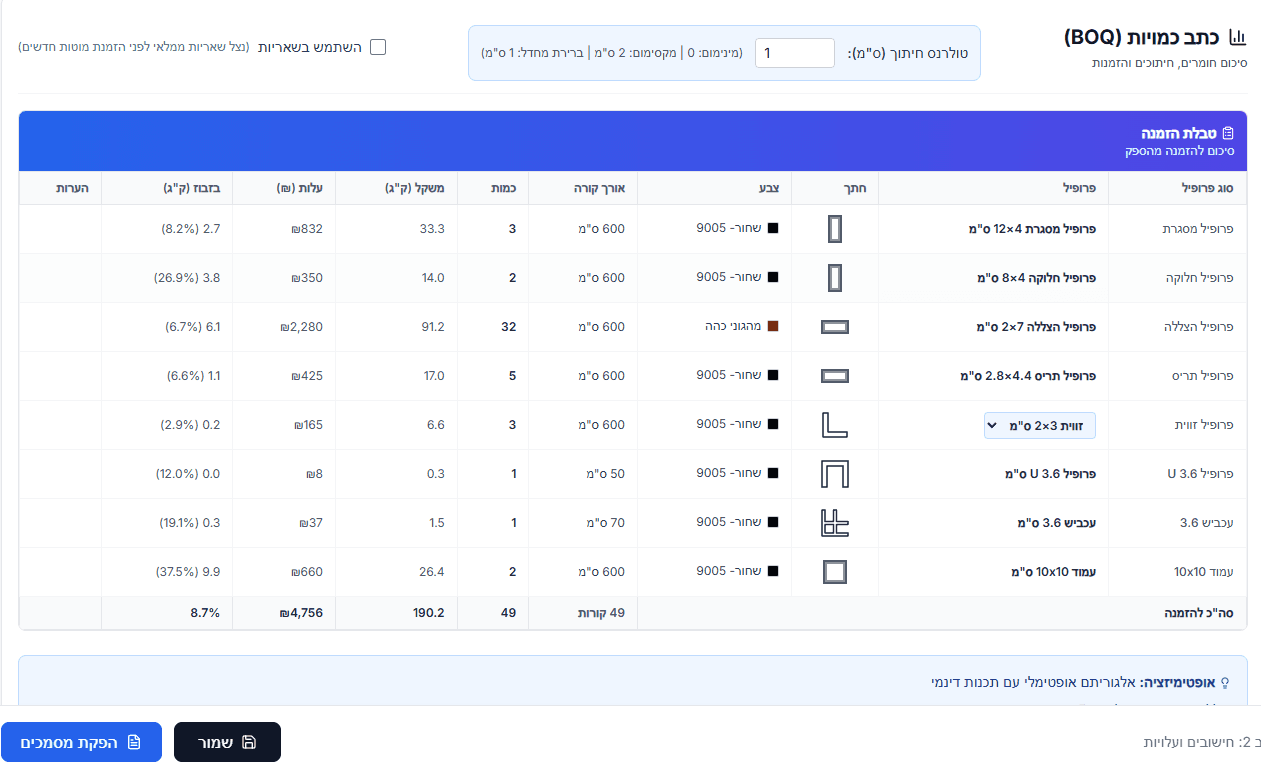
Automatic bill of quantities for aluminium pergolas
Every pergola manufacturer knows the routine: two hours in a spreadsheet, counting beams by eye, adding it all up by hand — and then production discovers a shading profile is missing anyway. AluFlow removes that work entirely: a complete, accurate bill of quantities is derived automatically from the 2D drawing.
What a pergola's bill of quantities contains
A bill of quantities (BOQ) is an ordered list of every material and component the pergola needs — with quantities, lengths and accurate cost. In AluFlow the BOQ is grouped into categories:
- Frame beams: The outer beams that define the pergola's shape.
- Division beams: Internal beams that stiffen the structure.
- Shading beams: The beams that produce the shading effect.
- Suntuf profiles: Profiles above the division beams that hold the polycarbonate sheets.
- Pillars: The vertical supports.
- Accessories: Corners, screws, holders, U-profiles and motors for adjustable louvres.
How AluFlow calculates the BOQ automatically
Instead of counting by hand, AluFlow reads your drawing and runs a sequence of engineering calculations:
- Identifying beams and pillars: Every beam in the drawing gets a profile code by type (frame / division / shading) and its length is computed to the millimetre.
- Miter cuts: At each junction the software derives the cut angles required (45°, 60° and so on).
- Accessory quantities: From the standard rules of the trade — a holder at every corner, a screw every 200 mm of frame beam, and so on.
- Combined with your own profile price list: every BOQ line gets a current price, and the project total is calculated automatically.
Why a manual spreadsheet BOQ is a problem
We spoke to dozens of manufacturers. Every one of them has a story about a quantities error that cost thousands — a mis-measured shading profile, forgotten miter angles, or a screw count estimated “by feel”. The recurring problems:
- Time: 2-4 hours for a mid-sized pergola. At 30 projects a month that is 100 hours nobody is spending on anything else.
- Errors: One missing digit in a length, or one wrong quantity, and the supplier order is wrong.
- Inconsistency: Every estimator does it differently. There is no company standard.
- Price updates: When a profile goes up in price, every live quote has to be updated by hand.
What you can do with the BOQ in AluFlow
- A customer quote: The BOQ becomes a quote automatically, with VAT, statuses (draft / sent / approved) and PDF export.
- A supplier purchase order: The profile list becomes a purchase order. One button, one email to the supplier.
- On to the cutting plan: the BOQ feeds the cutting optimisation directly — nothing is re-typed.
- On to the production plan: a printed cut list for the shop floor with lengths, angles and colours.
Start a 7-day free trial — draw one pergola and you will have a complete BOQ within five minutes. Charged only when the trial ends.
Prêts à commencer ?
7 jours d’essai gratuit avec accès complet. Le paiement ne démarre qu’à la fin de la période d’essai.