
Aluminium profile cutting optimisation
Spent ₪40,000 on aluminium stock and ended the project with ₪9,000 of it in the offcut pile? That is where cutting-optimisation software changes the bottom line. AluFlow takes every cut from your drawing and turns it into an optimal cutting plan — typically 15-25% less raw material.
Why waste is high on every aluminium project
Aluminium bars arrive from the supplier at a standard 6,000 mm. Every cut that does not divide neatly into that leaves a remainder. Done by hand, an operator works it out in their head or on paper — and that is not efficient. First cut off a 6-metre bar is 1,800 mm? 4,200 mm left. Next cut 2,500 mm? You could fit another 1,700 — but if the next cut on the list is 1,900, you have just opened a whole new bar.
How the FFD (First Fit Decreasing) algorithm works
AluFlow uses First Fit Decreasing — one of the most effective algorithms for the “bin packing” problem (fitting items into fixed-size containers). The steps:
- Expand: Every line with a quantity above 1 is broken into individual pieces. 30 beams of 4,200 mm become 30 identical cuts in the list.
- Sort descending: All cuts are ordered longest to shortest. The big cuts are placed first, then the small ones fill the gaps.
- Place: For each cut the algorithm checks every bar already open and puts it in the first one with room. If none has room, a new bar is opened.
- Compute waste: For each bar, the unused remainder and the utilisation percentage are calculated.
The result: large cuts occupy whole bars and small cuts fill space that would otherwise be waste. On real projects that is the difference between 90% and 65% utilisation.
What the cutting plan produces
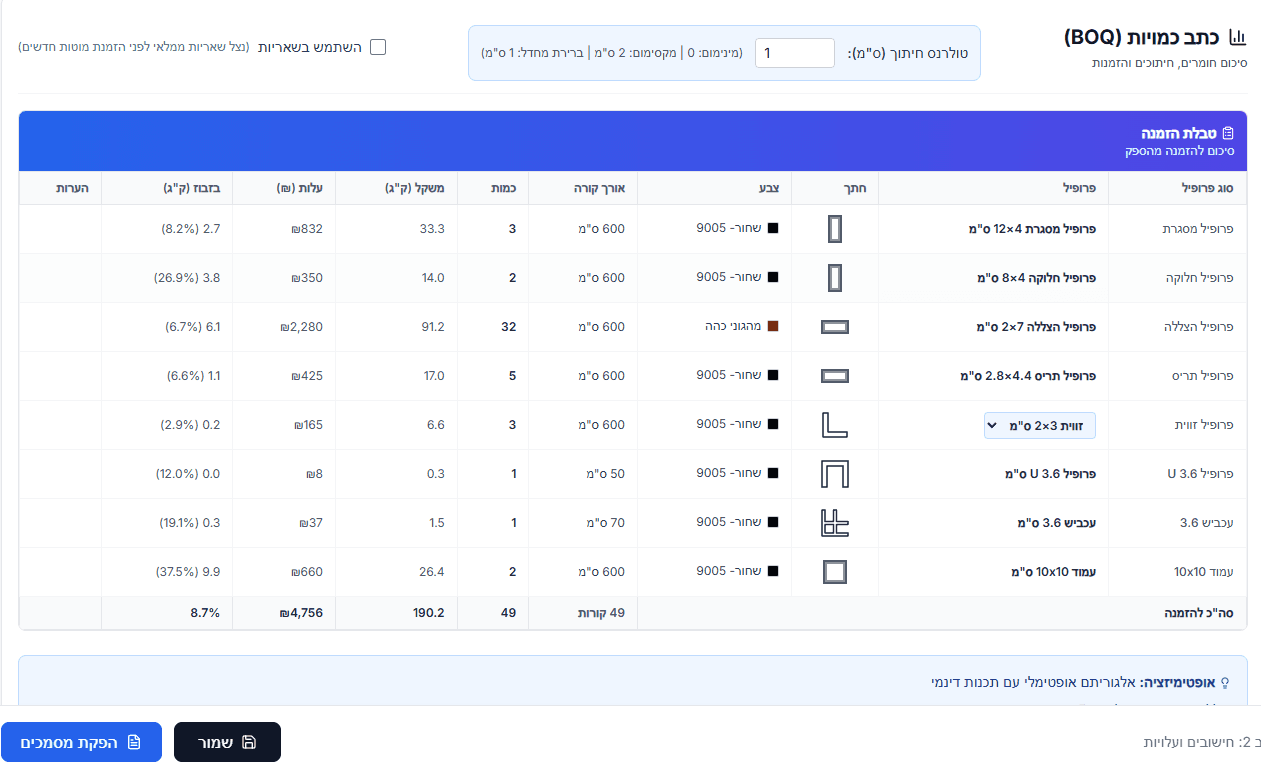
- Bar list: How many 6-metre aluminium bars to buy, by profile code. This is what the buyer sends the supplier.
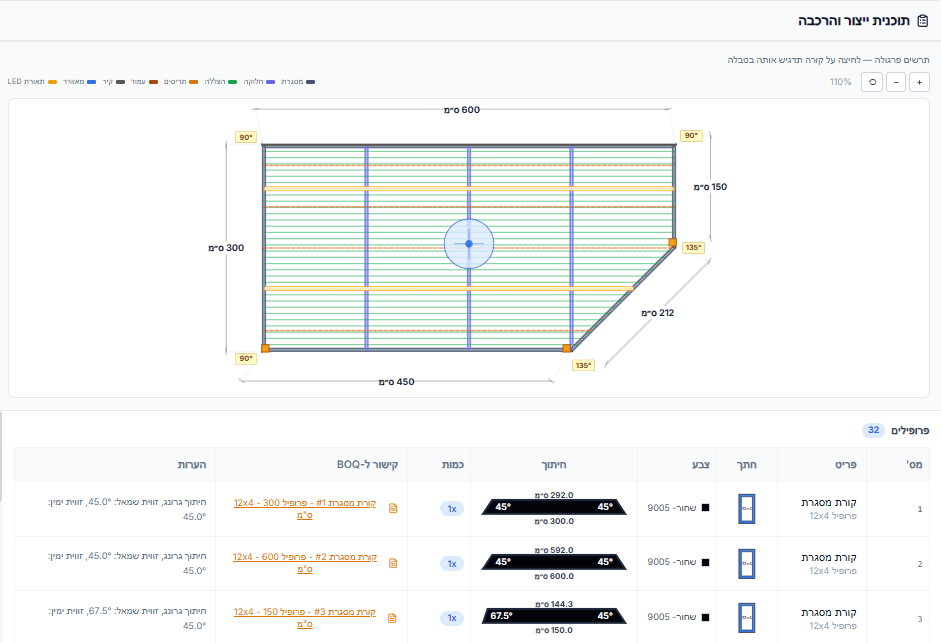
- A cutting plan per bar: Which cuts go on which bar, in what order, at what length, with which miter angle.
- Utilisation percentage: Per bar and for the project as a whole, so you can see whether there is room to improve.
- Total waste in mm and by weight: Costed against your supplier's price per kilo.
- A printable PDF: Ready to print and hand to the production team.
Combined with the automatic bill of quantities
In AluFlow, cutting optimisation does not require you to type in a cut list. Once the pergola is drawn, the software derives the bill of quantities — every beam, pillar, shading profile, corner and screw. That list feeds the cutting optimisation directly, which then minimises the number of bars required. No double entry and no transcription errors.
Frequently asked questions
Does it work with non-standard bar lengths?
Yes. AluFlow supports a custom stock length — if your supplier delivers 7- or 8-metre bars, that can be set per project.
Are miter (angled) cuts supported?
Yes. The cutting plan shows the angle at both ends of every cut (for example 45° / 90°). The angles are derived automatically from the 2D drawing, from the junctions between beams.
How do I start?
Open a 7-day free trial account — charged only when the trial ends. Draw your first pergola and get a complete cutting plan in minutes.
¿Listo para empezar?
Prueba gratuita de 7 días con acceso completo. El cobro comienza solo al finalizar el período de prueba.